
Tiles, Variations & 7–15% CPI Drop: How Code Maestro tripled playable iteration
 Alexander Goldybin
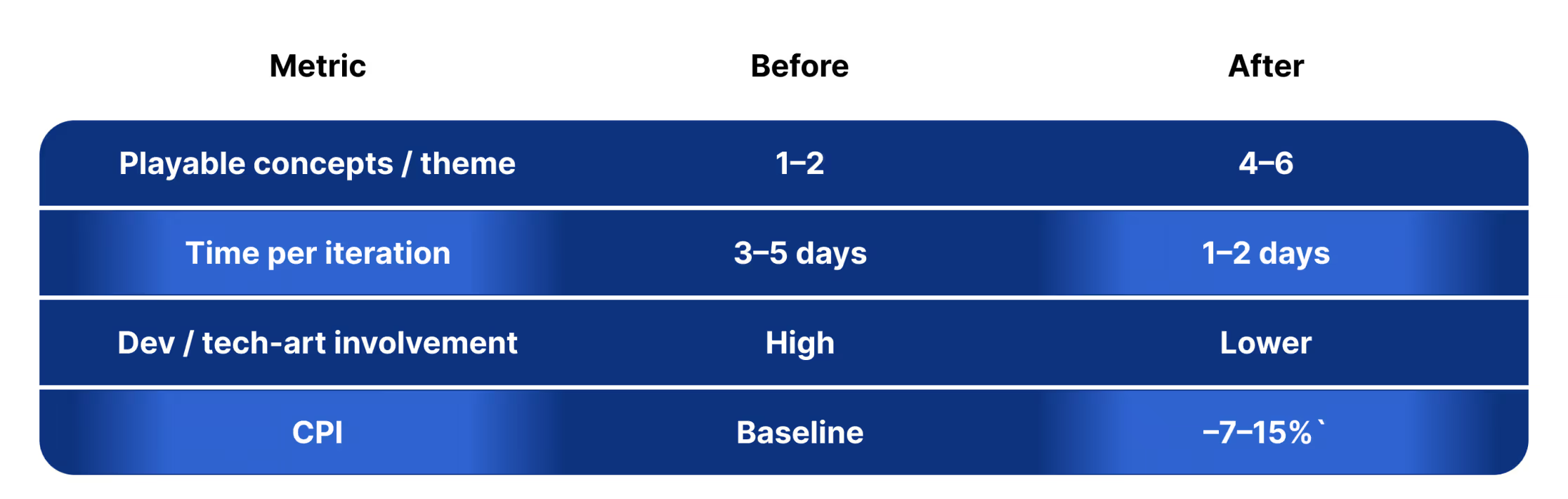
A mid-size US match-3 publisher increased playable-ad iteration from 1–2 to 4–6 concepts per theme while cutting engineering + tech-art workload by more than half.
This higher testing volume enabled faster discovery of winning creative angles, improving CPI by 7–15% with no new hires. Here’s how.
Situation
Playable ads were a key UA channel, but production capacity limited how many ideas could reach testing. Even small visual changes required engineering support, so only 1–2 concepts per theme were shipped — slowing learning and creating unstable CPI during seasonal bursts.
What slowed them down
• Unity playables required scene prep + manual visual updates • Visual/theme tweaks still consumed developer time • Animation-heavy ideas required extra work • Fewer concepts → fewer tests → slower CPI improvement
“Most ideas died before testing — we just couldn’t build fast enough.” Head of UA
Goals
• Increase number of playable-ad concepts per cycle • Reduce dependency on dev/tech-art • Improve CPI through faster creative learning
Solution
Code Maestro integrated into their Unity + JS workflow within a day.
Unity workflow The team still prepared trimmed gameplay scenes internally. Once those scenes were ready, Code Maestro automated visual changes (UI, palettes, icons) and enabled faster export. CM did not create Unity playables from scratch — iteration accelerated only after scene setup.
As a result, more concepts reached real testing faster, while engineering focused on core product.
Results
“Instead of choosing one idea, we ran several and doubled the odds of finding a winner.” UA Lead
Why it worked
• Reduced repetitive Unity visual prep • JS prototypes enabled early validation • More concepts → more tests → faster CPI learning • Less production drag → more time scaling winners
Workflow became: idea → scene prep → fast variants → test → scale
Business impact
• 2–3× more playable concepts tested • Faster CPI learning + better media allocation • Lower engineering + tech-art load • No new hires required
Even lightweight visual updates to prepared Unity scenes delivered measurable gains.
Takeaway
In match-3 UA, speed of playable-ad iteration drives CPI. Once a Unity scene is prepared, Code Maestro helps teams produce multiple variants quickly — enabling faster testing and improved performance without additional staffing.
Try Code Maestro with your team
To see whether CM can help your production velocity, choose one of the options below:
- Book a short workflow demo — we’ll walk through how CM integrates into Unity/JS and answer role-specific questions (UA, Creative, Tech). (link)
- Start a free trial — your team uses CM internally to create 2–3 themed variations and evaluate results in your own workflow.
If useful, we can also run a brief joint session with your Creative / UA teams to map current bottlenecks and suggest where accelerated iteration has the strongest performance impact.
We’d be glad to help your team move from idea → variation → live test faster and with less engineering effort.
Let’s talk.