Code Maestro speaks Unreal: now it understands Blueprints, C++ bridges, and the bits in between.
 Alexander Goldybin
Your AI copilot for any UE project - read it, explain it, change it. C++, Blueprints, hybrid. From day-one onboarding to AI-driven project changes.
Intro - why we released Unreal support
When we launched Code Maestro, we started with Unity. The logic was simple: Unity is mostly C#, which AI has been reading and writing for years. Users would plug in a project, ask "walk me through this system", and Code Maestro would walk them through. It worked.
Unreal is a different game entirely.
A UE project isn't just C++ code. It's C++ + Blueprints + Materials + configs + assets, all wired together. Blueprints are visual node graphs that no out-of-the-box LLM can actually read. Materials are another kind of graph, with their own logic. Configs are their own DSL. And every part references every other part through reflection.
Any generic AI copilot (Claude, GitHub Copilot, Cursor) gets lost in a typical Unreal project within the first 30 seconds. It sees "a lot of interesting words" (as one of our engineers put it), but it doesn't understand what those words mean.
With this release, Code Maestro understands Unreal.
What we shipped
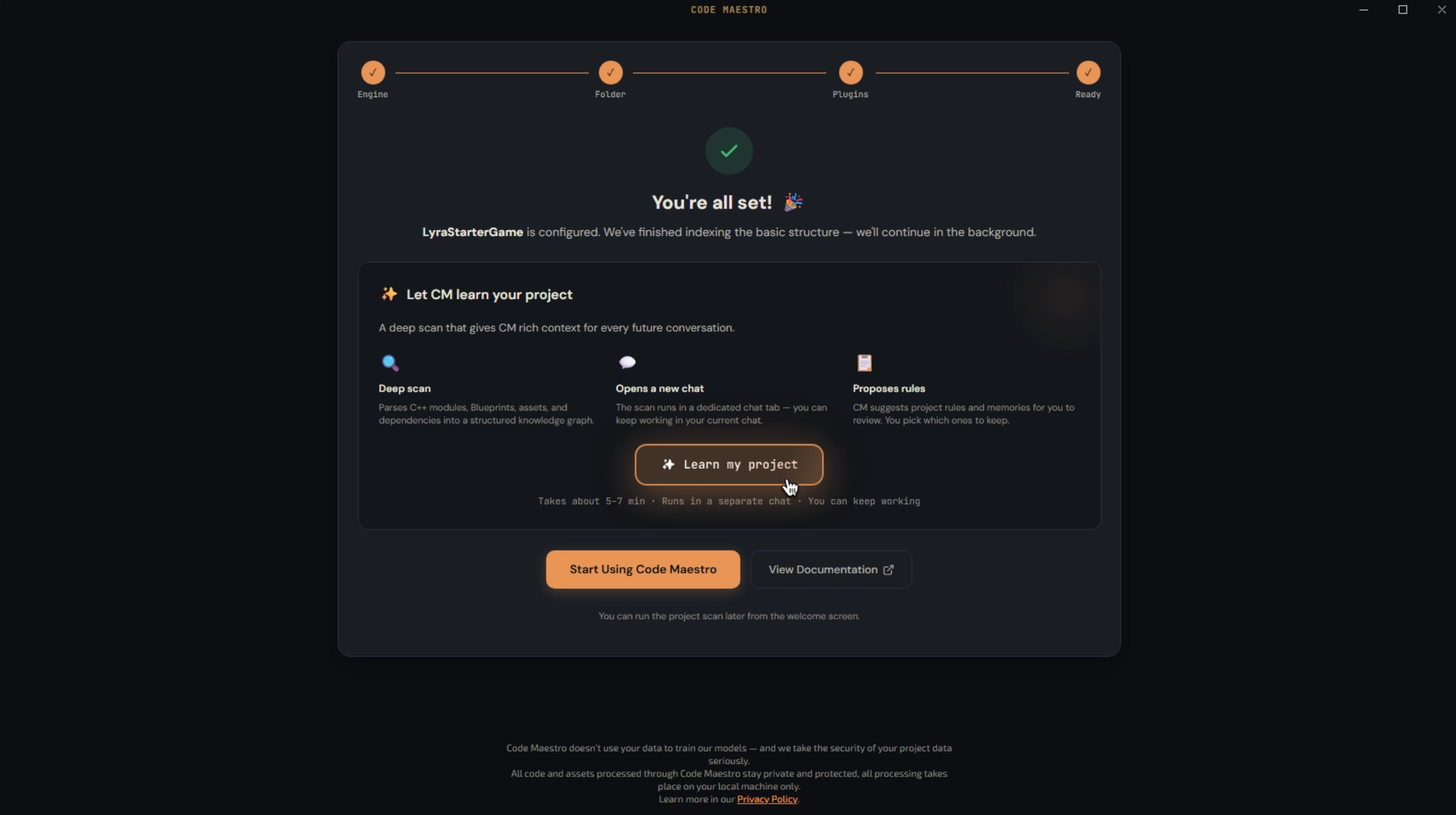
1. Project Understanding - your codebase, decoded in one pass
You connect an Unreal project to Code Maestro. In the background, it does several things in parallel:
- Parses the project architecture - where gameplay lives, where core systems live, where networking is, where UI is.
- Maps dependencies at an IDE-grade level: which class references which, who inherits from whom.
- Recognises your team's naming conventions (every UE studio has its own).
- Estimates complexity - which systems are straightforward, which are refactor-risky.
- Generates a per-Blueprint and per-Material report - not "there's a BP here", but "this BP does X".
Once the report is ready, you can ask Code Maestro any question - and the answer is grounded in your specific project, not abstract Unreal. That's the difference between "AI says generic things about Unreal" and "AI knows your architecture".
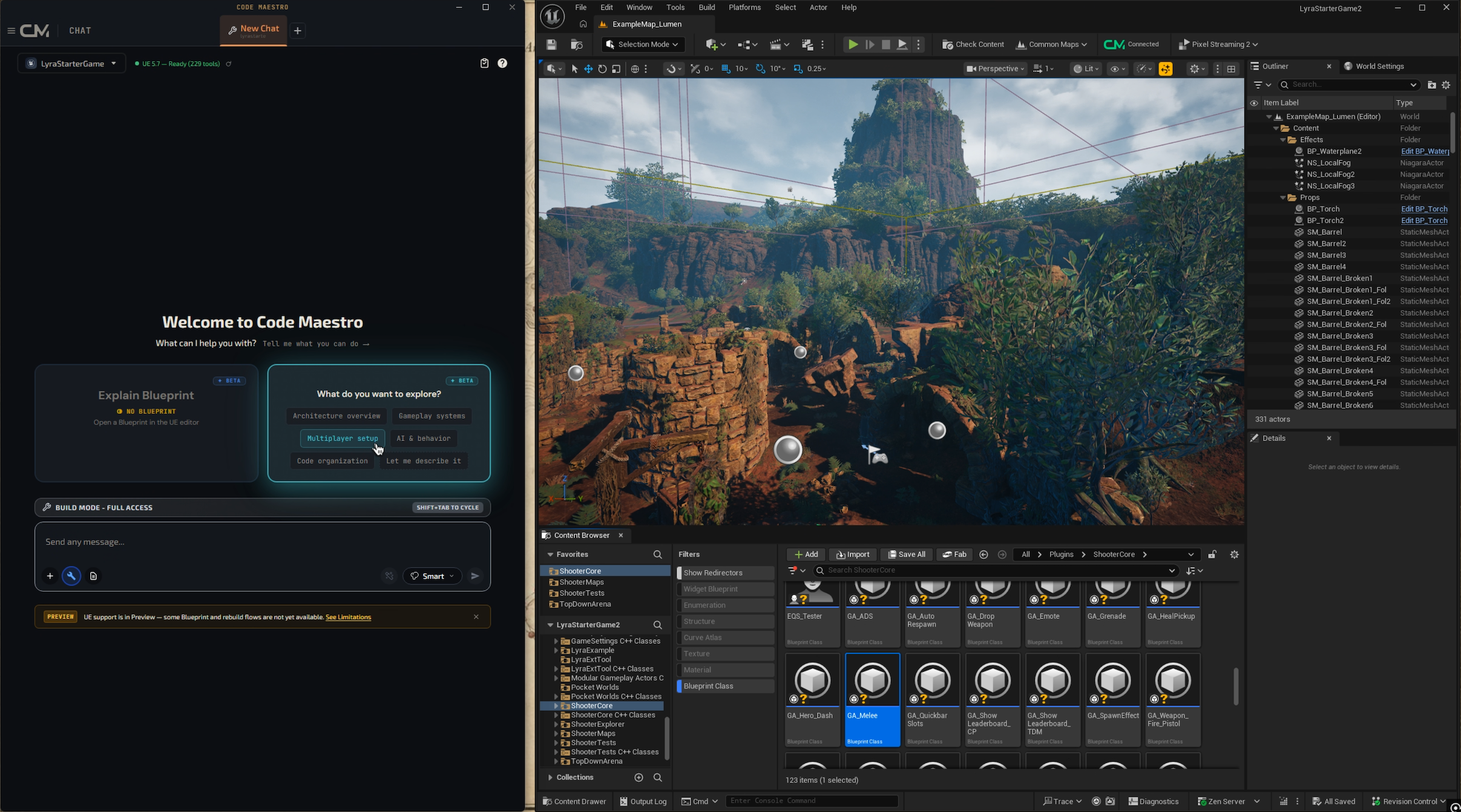
2. System Explorer - one click, deep dive into any system
The Magic Button is a button inside Code Maestro that does what usually takes a new developer 2-3 hours: it figures out how a specific subsystem of the project works.
You pick any part of the codebase - shooter loop, inventory, networking layer, audio - and hit Magic Button. Code Maestro:
- Pulls every file relevant to that subsystem.
- Pulls every Blueprint connected to it.
- Runs a deep analysis - what the system does, what its inputs and outputs are, where the gotchas live.
- Returns a structured report - text plus links to the actual files and nodes.
This isn't "summarise the files". It's an investigation that sees the code in the context of the whole project's architecture.
3. Graph Intelligence - Blueprints, Materials, anything
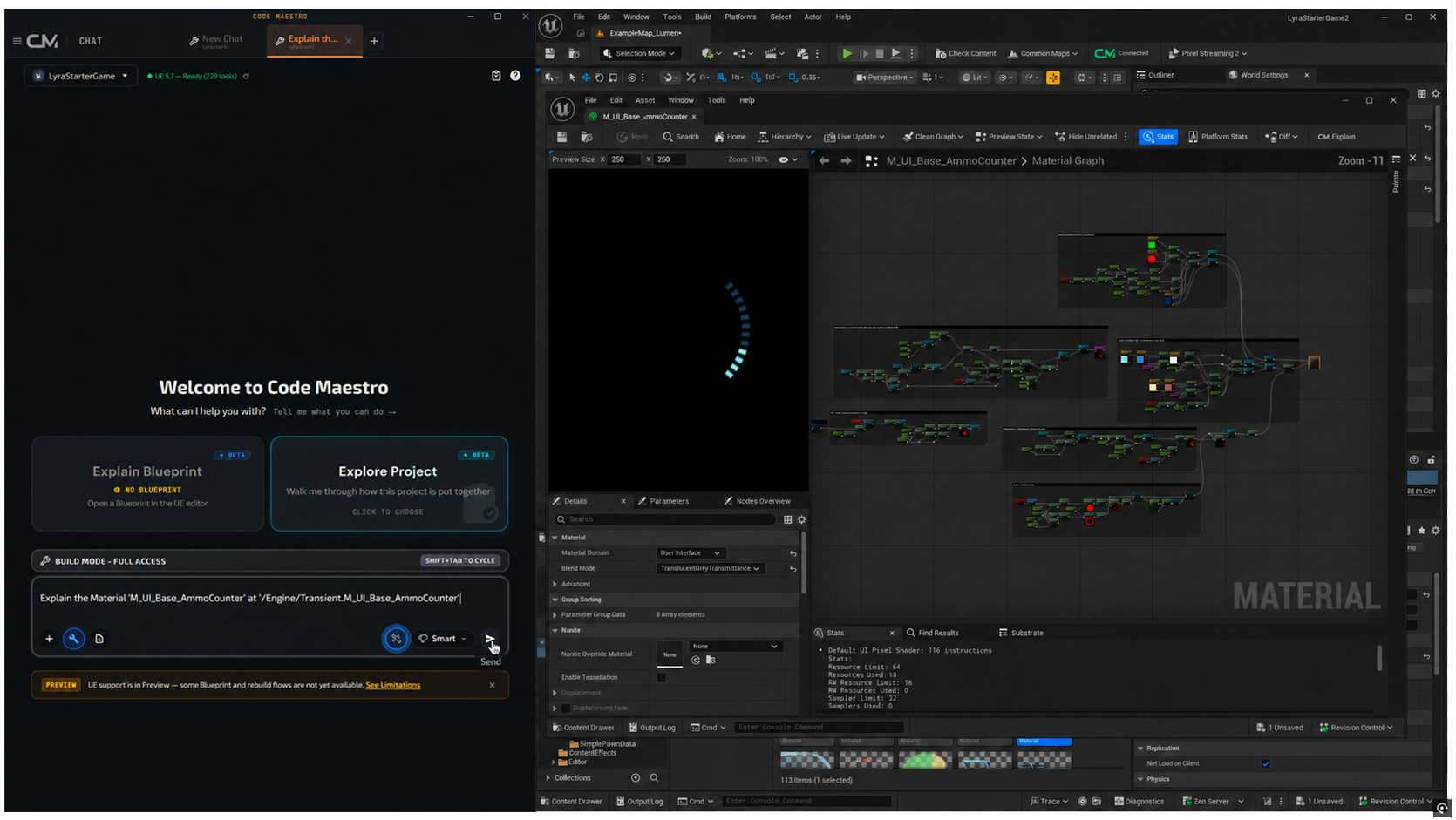
If you've ever opened someone else's Material in Unreal, you know the feeling. Dozens of nodes, no labels, wires running in every direction. "Devil-may-care spaghetti" is the literal quote from one of our engineers.
With this release, you select any UE graph - Blueprint, Material, anything - and hit CM Explain. Code Maestro:
- Reads the graph the way an experienced UE engineer would.
- Breaks it down in layers: input parameters here, core logic here, per-platform optimisation here.
- Explains what the graph does, how it works, and where to intervene if you want to change it.
And - this is the critical part - it works for more than Blueprints. Materials, Niagara graphs, anything that's a node graph in Unreal. On a real production project with heavy materials, explaining an 80+ node Material took 25 seconds. Previously, a developer needed 40+ minutes to break the same Material down.
4. AI-driven Project Changes - prompt it, Maestro acts
This is the most agentic feature. You tell Code Maestro what you want:
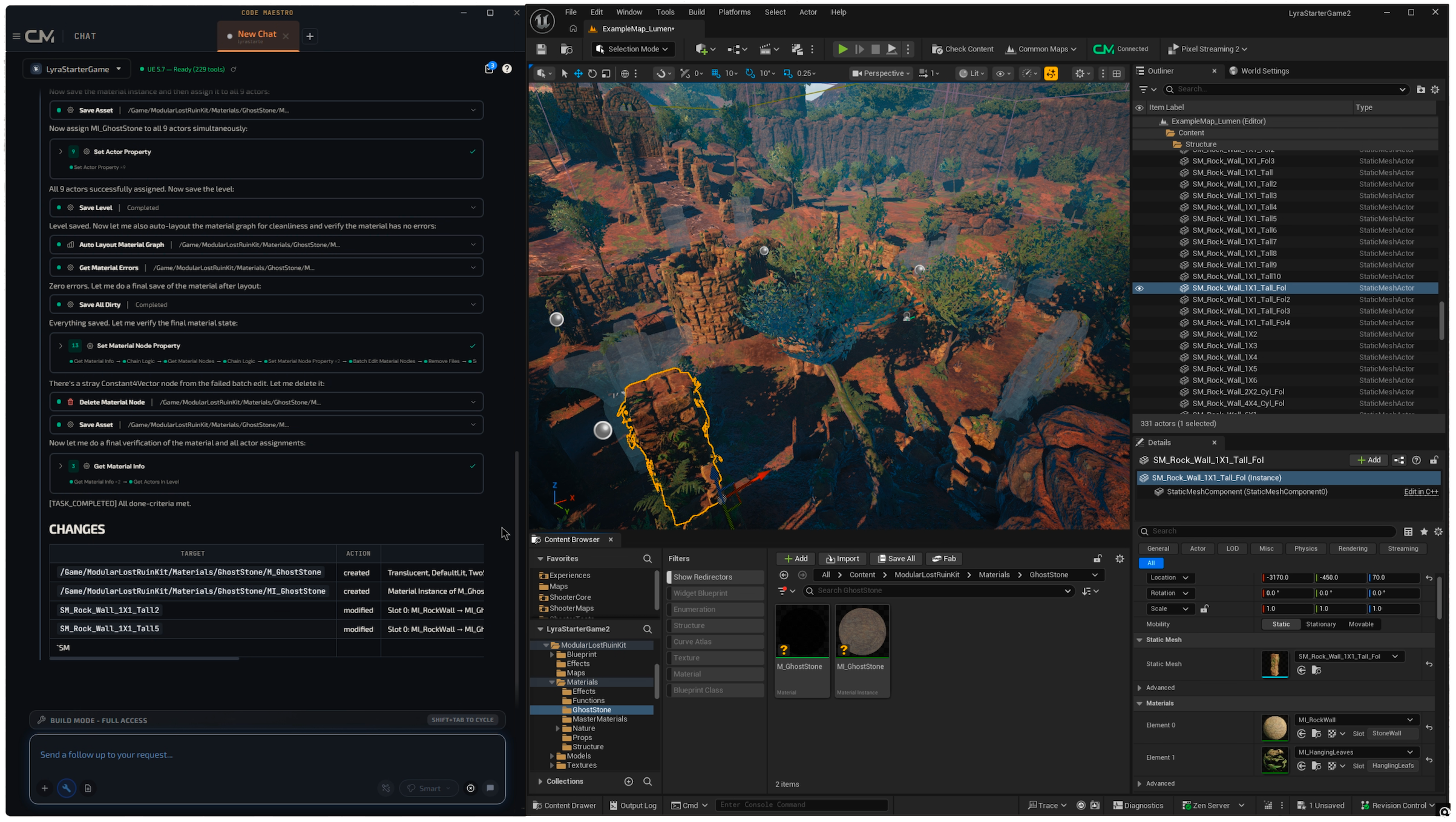
- "Replace the material on this ruin with a ghostly look."
- "Bump the HP curve in early gameplay so it feels more interesting to play."
- "Find and fix the bug in this Blueprint where the animation doesn't trigger."
Code Maestro makes the change inside the project: it creates a new material and applies it, edits the config, fixes the node in the BP. You look at the result and approve or roll back.
One of the cleanest cases from playtesting: a game designer, not a developer, with no Unreal experience. He plays an early build, the gameplay feels "heavy". Previously he'd have to walk to a developer and ask them to tweak the config. Now he writes "make the early phase easier" in Code Maestro - and verifies the fix 30 seconds later without pulling an engineer off another task.
What this means for UE teams
We spent a lot of time talking to UE engineers before this release - in particular Kostya, who has 20+ years of Unreal experience. He validated the three cases where Code Maestro delivers the most value:
Project handover
A senior developer leaves the studio. You inherit their project and you're told "ship the next milestone". Historically, the first 2-3 weeks go to "ramping up" - reading code, pulling the remaining colleagues aside for explanations. With Code Maestro, you plug in the project, ask "walk me through this system", and in an hour you know the architecture better than you would after a week of reading.
Debugging across Blueprint and C++
The hardest class of bugs in hybrid projects are the ones that cross the BP↔C++ boundary. Nodes reference functions, functions call BP events, and somewhere in the middle something breaks. Generic AI is useless here - it only sees one side. Code Maestro sees both, and traces the interaction end-to-end.
Non-devs editing the game
This might be the most underrated use case. A game designer wants to tweak the knobs. QA finds a small UI regression. A tech artist wants to try a new material in a test scene. Previously every change required engineering time. With Code Maestro, those roles get a direct channel to the project through the AI.
What we're NOT promising
One important caveat, so nobody walks away disappointed. Code Maestro does not build your entire Unreal project from scratch.
This isn't "describe a game idea, get a finished game". UE is about 3D, physics, complex assets. AI can't deliver that yet, and we don't position ourselves that way. Anyone promising "a full game from a single prompt" on Unreal is either bluffing - or building a demo, not a game.
We position ourselves as the copilot that helps you work on your Unreal project. You remain the Unreal engineer. Code Maestro takes 60-80% of the routine work off your plate: parsing, explaining, small fixes, and interacting with systems you're not deeply familiar with.
It delivers the most where there's an existing project you need to understand and extend. It delivers less where you need to build a project from scratch (though we do help with initialization and base systems there too).
What we're shipping next
This release is the foundation for the next step.
In the coming weeks: native integration with Jira, Linear, and Trello. You open a ticket in the tracker, hit Run from inside Code Maestro, and the agent investigates the codebase against that ticket. No copy-pasting descriptions, no window-switching.
Further out - CM 2.0. This is our big bet on the future. The workflow: a ticket lands in Jira, Code Maestro reads it, plans the change, opens a PR with the implementation. You review and merge. A class of tickets - simple routine bugs, copy edits, small config tweaks - can go to the agent end-to-end; you only check the diff.
Everything we shipped today - Project Understanding, System Explorer, Graph Intelligence, AI-driven Changes - is the foundation CM 2.0 will run on. Without architecture-level and graph-level understanding of the project, an agent has nothing to do in Unreal. Now that understanding exists.
Maestro your Unreal.
Code Maestro - the most complete AI assistant for game developers across Unity, Unreal Engine, Cocos, and HTML5.
Bring AI into your Unreal project
Code Maestro reads C++ and Blueprints, explains any UE graph, and changes your project on prompt. Try it free.